Knowledge Catalog
This chapter discusses the Knowledge Catalog and how to use it.
Page Contents
Overview
The Knowledge Catalog allows users to query virtual graph and data source metadata using SPARQL. The Knowledge Catalog is enabled by default. It watches for changes to virtual graphs and data sources and adds or updates the related metadata in the catalog database.
The Knowledge Catalog automatically creates a catalog database when it starts. Set the catalog.database server property to use a different name or prevent the Knowledge Catalog from using an existing database named catalog.
To prevent the Knowledge Catalog database from being created automatically set catalog.auto.create.db to false.
The catalog database is a system-managed database. Its contents are automatically populated and updated by Stardog. If you manually modify the contents of the catalog database, those changes may not be preserved during automated updates.
Configuration Options
The Knowledge Catalog can be configured with the following options in stardog.properties:
| Option | Description | Value | Default |
|---|---|---|---|
catalog.database | Name of the database to use for storing catalog metadata. If this database does not exist one will be automatically created. | string | catalog |
catalog.name | Name of the IRI used for the catalog named graph. | string | local |
catalog.reload.onstart | If true any existing catalog data will be dropped and all data sources and virtual graphs metadata will be loaded on server start. When false only new metadata will be captured after server start. | true/false | false |
catalog.auto.create.db | If false then the catalog database will not be created automatically at server start if it does not already exist. | true/false | true |
Permissions
All Knowledge Catalog operations require appropriate permissions. The following table lists the required permissions for each operation:
| Operation | Permission |
|---|---|
| View catalog status | read on db:<catalogDb> |
| Reload a catalog provider | write on db:<catalogDb> |
| Reload catalog model | write on db:<catalogDb> |
| Run a catalog job | execute on database-admin:<catalogDb> |
| List stored credentials | read on dbms-admin:credentials |
| Store provider credentials | write on dbms-admin:credentials |
| Remove provider credentials | delete on dbms-admin:credentials |
Where <catalogDb> is the name of the catalog database (default: catalog).
For example, to grant a role full access to catalog operations on the default catalog database:
$ stardog-admin role grant -a read -o db:catalog -- myrole
$ stardog-admin role grant -a write -o db:catalog -- myrole
$ stardog-admin role grant -a execute -o database-admin:catalog -- myrole
To grant access to credential management:
$ stardog-admin role grant -a read -o dbms-admin:credentials -- myrole
$ stardog-admin role grant -a write -o dbms-admin:credentials -- myrole
$ stardog-admin role grant -a delete -o dbms-admin:credentials -- myrole
Usage
The capture and storage of Stardog metadata happens automatically and without user interaction. Users can interact with the Knowledge Catalog with SPARQL queries and Explorer (to visually explore the metadata). The Explorer query builder can also be used to query the metadata model.
To query only metadata, run SPARQL queries against the catalog database. To query metadata in addition to another database, the local database service can be used.
Data Model Classes
This table contains the classes used for modeling the Knowledge Catalog metadata.
| Class | Description |
|---|---|
dcat:Catalog | Top level class for all metadata |
dcat:Dataset | A collection of data available for access in one or more representations |
tag:stardog:api:catalog:DataSource | A distribution of a data source |
tag:stardog:api:catalog:Schema | The tables that are part of a data source |
tag:stardog:api:catalog:Table | A single table |
tag:stardog:api:catalog:Column | A table column |
tag:stardog:api:catalog:VirtualGraph | The configuration for a virtual graph |
tag:stardog:api:catalog:Mapping | Mappings of tables to RDF |
Example SPARQL Queries
The following are some query examples that demonstrate how virtual graph metadata can be queried.
- What catalogs are available?
prefix dcterms: <http://purl.org/dc/terms/> prefix dcat: <http://www.w3.org/ns/dcat#> select ?src ?lbl where { graph <tag:stardog:api:catalog:local> { ?src a dcat:Catalog ; dcterms:title ?lbl }} - What datasets are in the catalog?
prefix dcterms: <http://purl.org/dc/terms/> prefix dcat: <http://www.w3.org/ns/dcat#> select ?ds where { graph <tag:stardog:api:catalog:local> { ?src a dcat:Catalog ; dcat:dataset ?ds . }} - Query for all table columns across all datasets
  prefix : <tag:stardog:api:catalog:>
  select *
  from stardog:context:local
  where {
      ?t a :Table ;
         :hasColumn ?c .
      ?c :columnName ?n .
  }
Data Source Linking
When data sources and virtual graphs are added to the Knowledge Catalog, their source data and graph maps are scanned for table and column references. Those references are then linked together through a tag:stardog:api:catalog:mapsColumn attribute.
This can be useful information for finding how a triple is mapped to an external database and which tables and columns were used.
- Example query to see all mapped columns:
select * from stardog:context:local { ?s stardog:catalog:mapsColumn ?o . } - Example path query from a known predicate to its mapping:
  PATHS shortest
  from stardog:context:local
  start ?s = <http://example.org/comvendor#nr>
  end ?e = <tag:stardog:api:catalog:bsbm:benchmark:vendor:nr>
  via {
      ?pomap <http://www.w3.org/ns/r2rml#constant> ?s ;
             stardog:catalog:mapsColumn ?e .
  }
Explorer
After you have the Knowledge Catalog configured and running on your server, you can log into Explorer and select your catalog database to begin exploring.
Explorer caches the catalog data when you log in. If you make changes to virtual graphs in Studio or on the command line, you will need to refresh Explorer to see the changes.
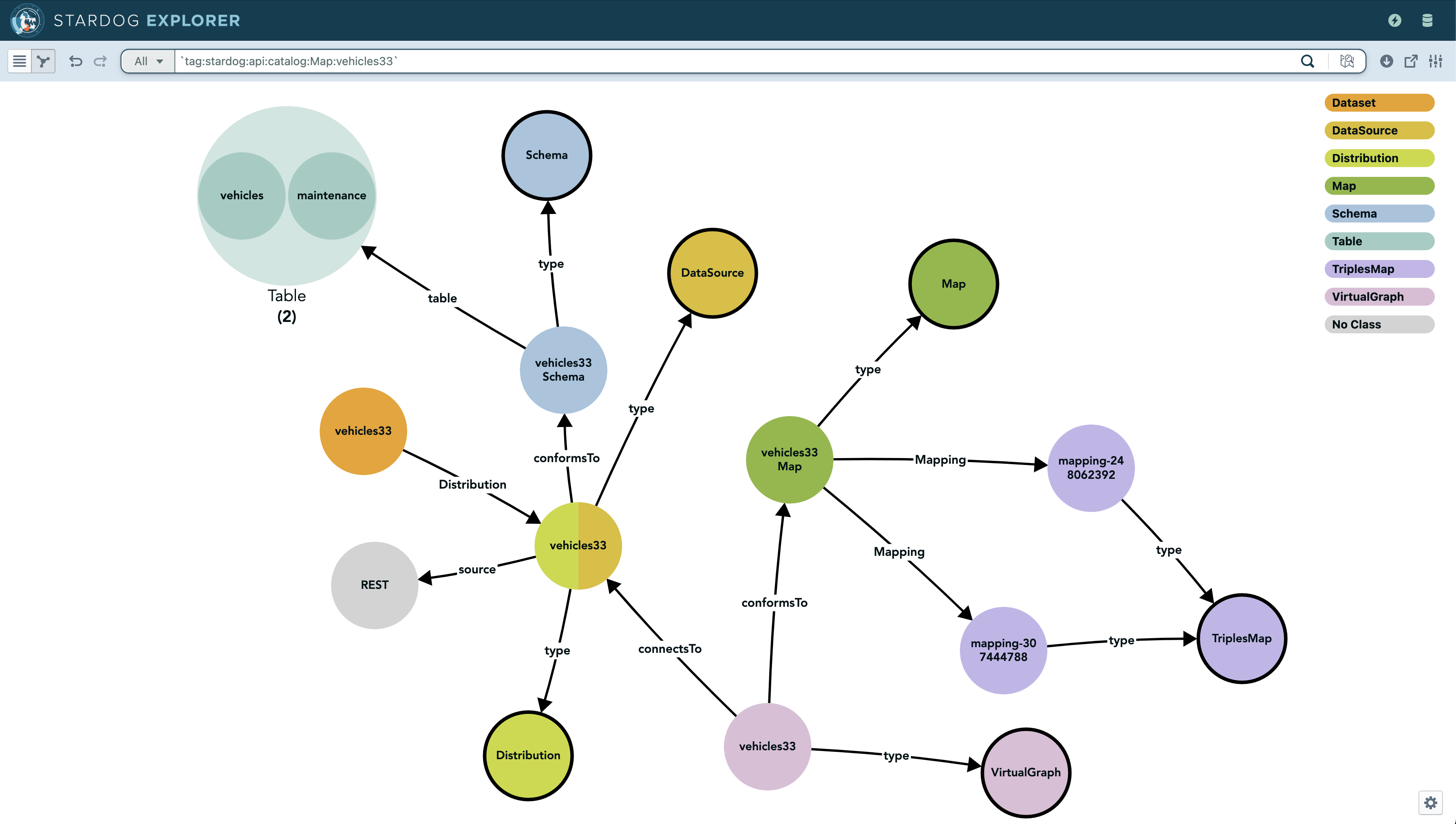
Explorer Query Builder
Properties have been added to enable the Explorer query builder functionality with the Knowledge Catalog.

Simplified Model
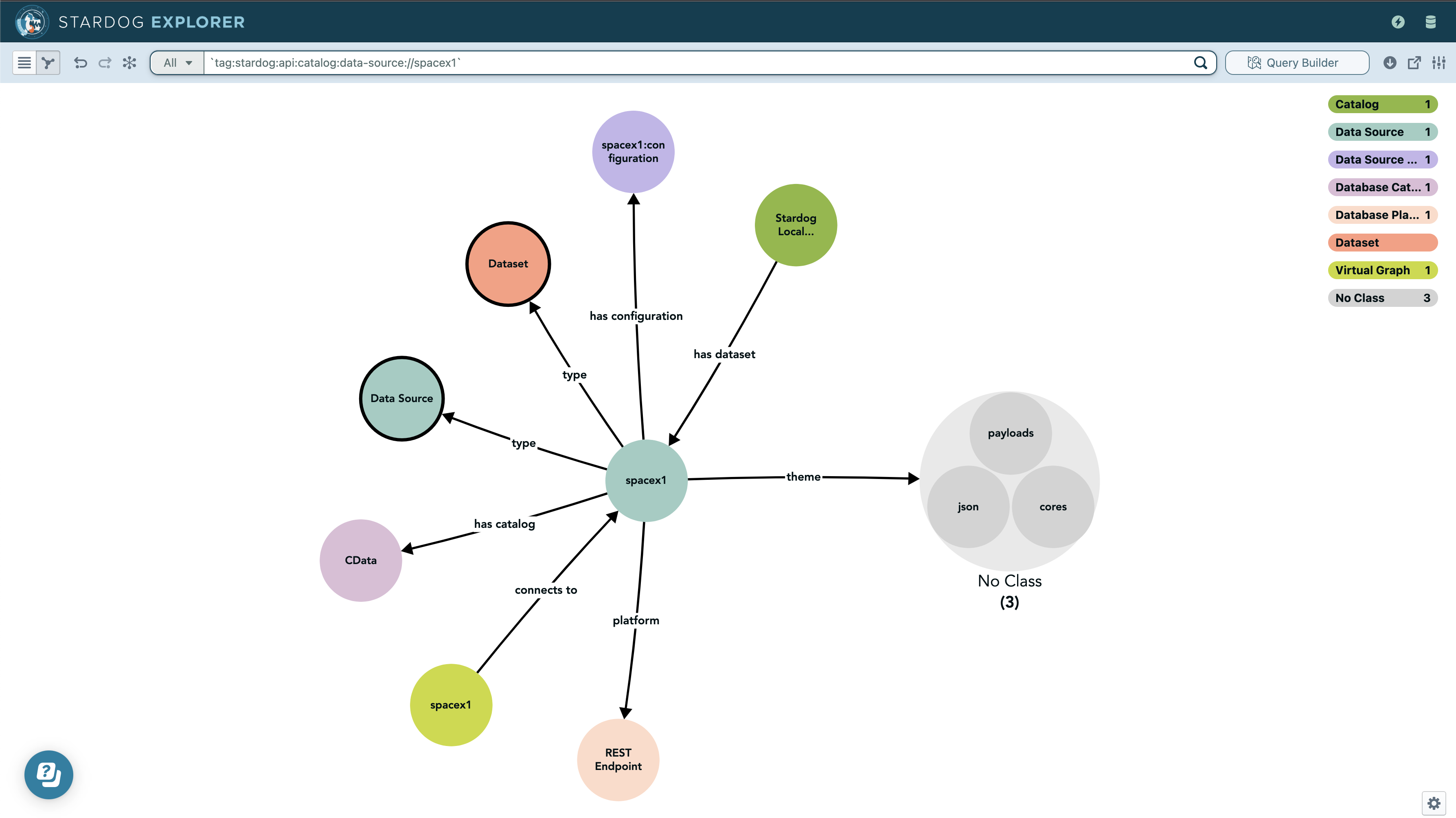
To simplify navigation of Stardog data source columns to mapped virtual graphs, new rules have been added to the catalog model starting with Stardog 9.0.0. See Reloading the Catalog Model for information on upgrading the catalog model.
In this screenshot the theme property has been added by the simplified model rules. Note that reasoning must be turned on for these rules to apply.
Reloading the Catalog Model
With each new release of Stardog, updates may be added to the default model that comes with the catalog. This model is automatically loaded when the catalog database is created, however, it is not automatically updated when Stardog is upgraded. For users that upgrade, the latest version of the model can be loaded by using the stardog-admin catalog reload-model CLI command. The reload process will replace all the data in the schema graph (tag:stardog:api:context:schema). It is recommended to back up the catalog database prior to performing a model reload.
In Stardog versions prior to 12, the catalog schema was stored in the default graph. Starting with Stardog 12, newly created catalog databases store the schema in the named graph tag:stardog:api:context:schema. For existing catalog databases upgraded from earlier versions, see the migration guide for instructions on migrating to the new schema location.
- External Catalogs - adding metadata from external catalog systems
- Secrets Integration - retrieving credentials with secret managers