Stardog Launchpad Release Notes
Stardog Launchpad is distributed as a Docker image, which includes the Launchpad web app together with the Stardog Applications (Studio, Explorer, and Designer, Knowledge Catalog).
Getting the Current Version of Launchpad
The latest release of Launchpad is available from Stardog’s Docker Hub repository. Pull it, replacing the tag with the release you want to run:
docker pull stardog/launchpad:v4.2.0
Version Scheme
Launchpad uses semantic versioning.
Launchpad Releases
4.2.0 Release (2026-10-30)
New Features
- Added
VOICEBOX_MODEL_GENERATION_TIMEOUTto set how many seconds Launchpad waits for the Voicebox Service to generate a Designer model. Generating a model from a large input could previously fail after 75 seconds, which remains the default. The Voicebox Service and any proxy in front of Launchpad must allow at least as long. Launchpad stops API requests at 300 seconds, so higher values have no effect.
Modifications
- Updated bundled Stardog Applications (Designer, Explorer, Studio, Knowledge Catalog) to their latest versions.
Security
- Updated internal packages and dependencies to address security vulnerabilities.
4.1.1 Release (2026-10-22)
Security
- Updated internal packages and dependencies to address security vulnerabilities.
4.1.0 Release (2026-10-19)
New Features
- Added
OKTA_USERNAME_FIELDandAZURE_USERNAME_FIELDto choose which claim from the identity provider becomes a new user’s Launchpad username. The defaults,emailfor Okta andpreferred_usernamefor Microsoft Entra, keep the current behavior. Changing either setting affects only accounts created afterwards; existing users keep their usernames.
Bug Fixes
- Fixed an issue where a user whose email or username changed in Okta or Microsoft Entra could end up with a second Launchpad account on their next login. Launchpad now recognizes returning users by the identity provider’s immutable user ID (Okta’s user ID, Entra’s
oid), so these users keep their account, connections, and Voicebox history. - Fixed an issue where a Launchpad tab left open after a user’s Stardog authentication had expired no longer showed the Stardog Authentication Failed prompt. Opening Designer, Explorer, or Studio instead returned the user to the landing page with no explanation. The landing page now checks the connection again when the user returns to the tab, and shows the prompt to sign in again.
- Fixed an issue where starting a new Voicebox chat did not keep the settings of the current chat.
Modifications
- Upgraded the bundled nginx to 1.30.4.
- Updated bundled Stardog Applications (Designer, Explorer, Studio, Knowledge Catalog) to their latest versions.
Security
- Upgraded Django to 5.2.17.
- Updated internal packages and dependencies to address security vulnerabilities.
4.0.1 Release (2026-09-10)
Bug Fixes
- Fixed an issue where Designer disabled Publish and showed “Insufficient privileges to create or read data sources” for users who signed in with SSO and held the required permissions through a role. These users can now publish and create data sources in Designer. Fixed in Designer v3.11.1.
Modifications
- Updated bundled Stardog Applications (Designer, Explorer, Studio, Knowledge Catalog) to their latest versions.
4.0.0 Release (2026-08-28)
Voicebox Service v1.0.0 is now generally available, and every Launchpad deployment must change its configuration in this release.
All Voicebox traffic — the Launchpad UI and the public API alike — is now served by the Voicebox Service v1.0.0. Three options changed meaning, and each one now maps to a specific version of the service:
| Option | Points at | In this release |
|---|---|---|
VOICEBOX_SERVICE_ENDPOINT | Voicebox Service v1.x | Required. All traffic routes here. |
VOICEBOX_LEGACY_SERVICE_ENDPOINT | Voicebox Service v0.x | Optional, and only used for rollback. |
VOICEBOX_BETA_SERVICE_ENDPOINT | a v1.0.0-beta build | Remove it. |
A deployment keeping v0.x around for rollback ends up with:
VOICEBOX_SERVICE_ENDPOINT=http://voicebox-v1-service:8000
VOICEBOX_LEGACY_SERVICE_ENDPOINT=http://voicebox-v0-service:8000
VOICEBOX_USE_LEGACY_SERVICE=false
If you were not in the Voicebox Service beta: point VOICEBOX_SERVICE_ENDPOINT at your v1.x deployment. This is required. Left pointing at a v0.x service, Launchpad sends v1.x request paths to it and Voicebox requests fail with 404.
If you were in the Voicebox Service beta: make both of these changes together.
- Set
VOICEBOX_SERVICE_ENDPOINTto the URL currently inVOICEBOX_BETA_SERVICE_ENDPOINT. That is already av1.xdeployment. - Remove
VOICEBOX_BETA_SERVICE_ENDPOINT. Leaving it in place keeps the beta routing split active, which sends UI traffic tov1.xonv0.xrequest paths, and those requests fail with404.
In both cases you may optionally set VOICEBOX_LEGACY_SERVICE_ENDPOINT to a v0.x deployment, which makes VOICEBOX_USE_LEGACY_SERVICE=true available as a single-option rollback. Treat that rollback as a temporary measure while you resolve an upgrade problem, not as a long-term configuration.
To verify the upgrade: after restarting, the voicebox_service_routing startup log event names the endpoint Launchpad will route to. Confirm it is your v1.x deployment. Voicebox answers failing while Designer and dataset descriptions still work is the signature of a deployment still pointing at a v0.x service.
New Features
- Voicebox Service
v1.0.0is generally available. Launchpad routes all Voicebox traffic to it by default, replacing both the previous-generation service and the opt-in public API beta introduced in 3.11.0. The Voicebox Service beta period is complete. - Added
VOICEBOX_LEGACY_SERVICE_ENDPOINTandVOICEBOX_USE_LEGACY_SERVICEto keep a previous-generation Voicebox Service deployment available as a rollback target. Traffic is never routed to it unlessVOICEBOX_USE_LEGACY_SERVICE=true. The rollback is intended as a temporary measure, not a long-term configuration. - The Voicebox Service persists the results of the queries it runs, so a later turn in a conversation can reuse a result without re-querying Stardog. These frames can be stored on local disk, in Amazon S3, or in Azure Blob Storage. Local disk is the default and requires a persistent volume; the S3 and Azure backends do not, and allow the service to run more than one instance. See Frame Stores for a comparison and the configuration for each.
Bug Fixes
- Fixed authentication failures under concurrent load. Launchpad’s embedded database could hit lock contention during heavy writes and return a misleading
401; it now contends less, and returns503when token validation genuinely cannot complete.
Modifications
- Think Mode no longer applies. The Voicebox Service
v1.0.0reasons across multiple steps on every question rather than behind a toggle, soVOICEBOX_THINK_MODE_ENABLEDnow affects only a deployment rolled back to the previous-generation service. - Updated bundled Stardog Applications (Designer, Explorer, Studio, Knowledge Catalog) to their latest versions.
Deprecations
VOICEBOX_BETA_SERVICE_ENDPOINTis deprecated. It is still accepted to ease the upgrade from the beta, and preserves the beta routing split exactly, but Launchpad logs a deprecation warning at startup when it is set. Migrate toVOICEBOX_SERVICE_ENDPOINT.
Security
- Removed Python development dependencies from the production image, reducing the shipped dependency surface.
- Updated internal packages and dependencies to address security vulnerabilities.
3.11.0 Release (2026-06-30)
The Voicebox public API beta is optional and off by default. To try it, run the beta Voicebox Service (v1.0.0-beta.1+) and point Launchpad at it with VOICEBOX_BETA_SERVICE_ENDPOINT. See Deploying the Voicebox Service for setup. The stable Voicebox Service (v0.30.0 at the time of writing) continues to serve all other Voicebox traffic.
New Features
- Added the ability to route existing Launchpad public API traffic to a beta build of the Voicebox Service. This is not a new API - the public API endpoints and response format are unchanged; only the backend service handling the requests is swapped. When
VOICEBOX_BETA_SERVICE_ENDPOINTis set, public API requests are routed to the beta service; all other traffic continues to use the stable service. See Deploying the Voicebox Service.
Bug Fixes
- Fixed an issue where Designer could fail to load with an
Uncaught SyntaxError: Unexpected token '<'error. Launchpad’s bundled web server now serves Designer’s pre-compressed (gzipped) assets correctly.
Modifications
- Updated bundled Stardog Applications (Designer, Explorer, Studio, Knowledge Catalog) to their latest versions.
Security
- Updated internal packages and dependencies to address security vulnerabilities.
3.10.0 Release (2026-06-17)
New Features
- Added a new Stardog Units Dashboard for monitoring Stardog usage.
- Added support for using Auth0 as a login provider to authenticate users into Launchpad. See Auth0 Login Provider for more information.
Modifications
- Updated branding across the Launchpad interface.
- Updated bundled Stardog Applications (Designer, Explorer, Studio, Knowledge Catalog) to their latest versions.
Security
- Updated internal packages and dependencies to address security vulnerabilities.
3.9.1 Release (2026-05-01)
Modifications
- Updated Stardog Studio to v5.11.1.
Security
- Updated internal packages and dependencies to address security vulnerabilities.
3.9.0 Release (2026-05-01)
Breaking change: Launchpad now runs as a non-root user (launchpad, UID 100001) by default. Previously the default was root (UID 0).
If you are upgrading from v3.8.x or earlier and your /data volume is owned by root, the container will fail to start. To resolve this, either:
- Change ownership on the host:
sudo chown -R 100001:100001 /path/to/launchpad/data, or - Continue running as root by passing
--user 0:0todocker run.
The container’s entrypoint prints this guidance if it detects an unwritable /data directory. See Run Launchpad with a Given User for more on running with a custom UID.
Modifications
- The Launchpad Docker image now runs as a non-root user (
launchpad, UID100001) by default. This improves security posture out of the box and supports deployments that require running as a non-root user. Existing flexibility is preserved: you can still run as root with--user 0:0, run with an arbitrary UID via--user <uid>:0, or use OpenShift-style random UIDs. See the upgrade notice above for migration guidance. - Updated bundled Stardog Applications (Designer, Explorer, Studio, Knowledge Catalog) to their latest versions.
Security
- Updated internal packages and dependencies to address security vulnerabilities.
3.8.4 Release (2026-04-09)
Modifications
- Updated bundled Stardog Applications (Designer, Explorer, Studio, Knowledge Catalog) to their latest versions.
Security
- Updated internal packages and dependencies to address security vulnerabilities.
3.8.3 Release (2026-03-30)
Bug Fixes
- Fixed a login failure that could occur when the identity provider returns the
email_verifiedclaim on the ID token as a string value instead of a boolean.
3.8.2 Release (2026-03-23)
Security
- Update internal packages and dependencies to address security vulnerabilities.
3.8.1 Release (2026-02-24)
Bug Fixes
- Fixes an issue where Voicebox “Think Mode” was always being used for Voicebox requests, even when not selected by the user in the UI.
3.8.0 Release (2026-02-19)
Recommended Stardog Version: v12.0.0+
Recommended Voicebox Service Version: v0.25.0+
If you intend to use Stardog unit usage tracking, you must use v12.0.0+ of Stardog and v0.25.0+ of the Voicebox Service.
New Features
- Adds the ability to track Stardog unit usage for a given endpoint.
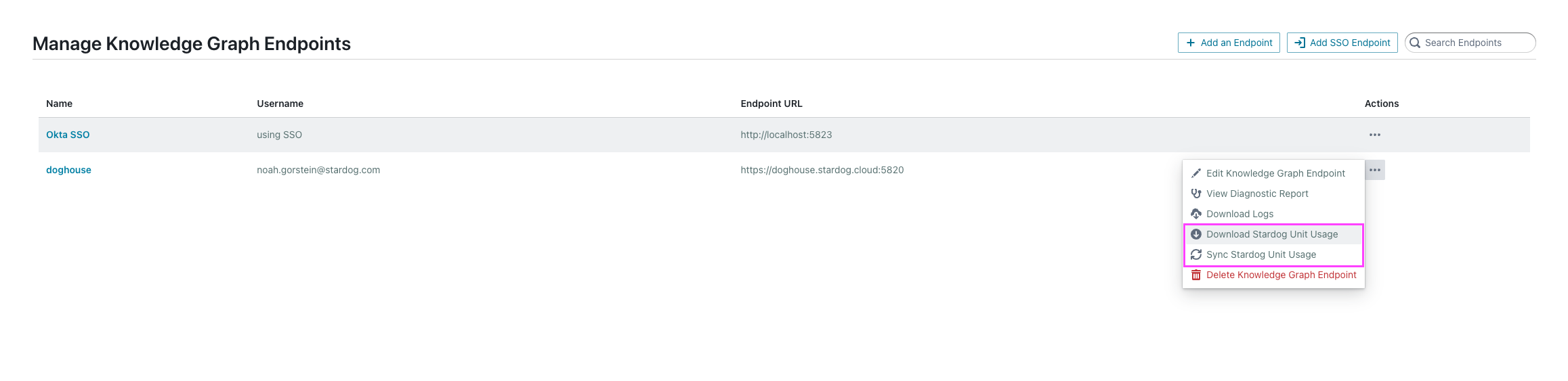
Stardog unit usage tracking is in beta.
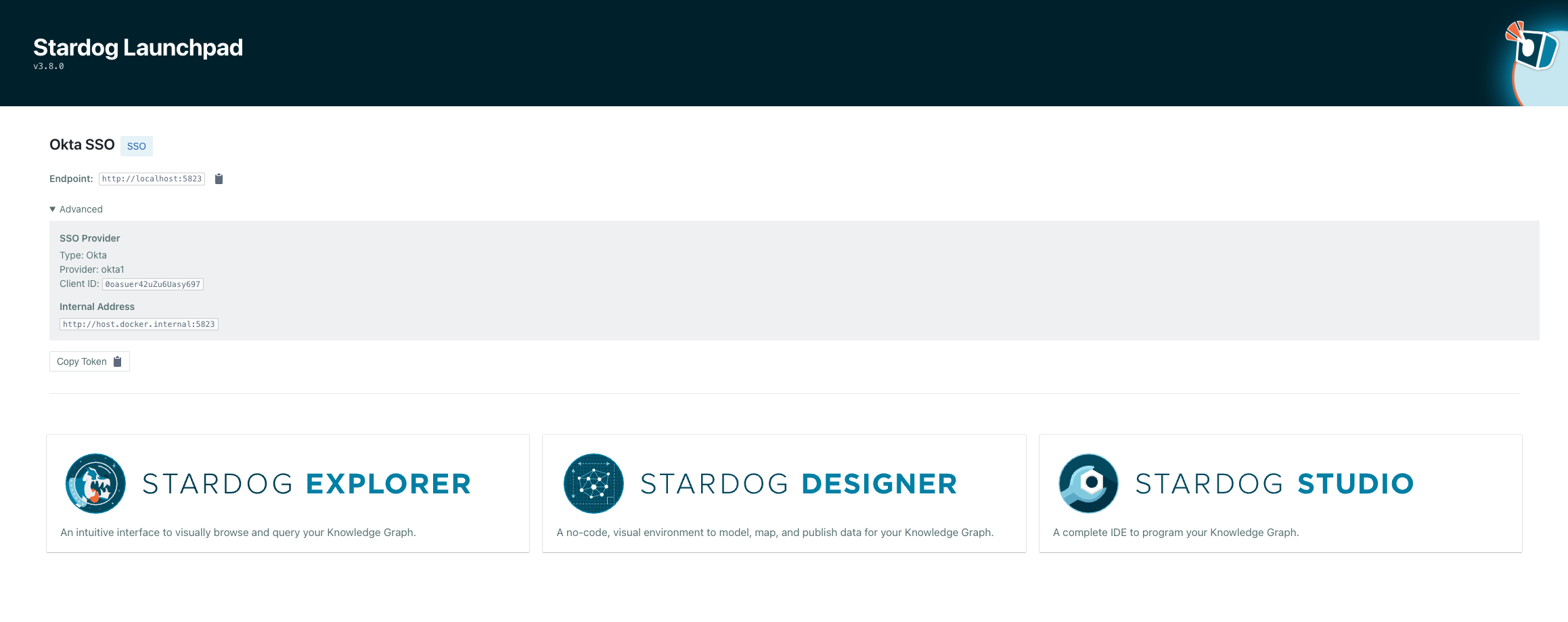
- Adds an “Advanced” section to the connection page, allowing users to view SSO connection settings and internal endpoint configuration for a connection.
Security
- Change to using a hardened Docker base image, significantly reducing security vulnerabilities.
3.7.0 Release (2025-12-18)
Recommended Stardog Version: v11.2.0+
Recommended Voicebox Service Version: v0.24.0+
If you intend to use JWT authentication with Okta for Voicebox, you must use v0.24.0+ of the Voicebox Service.
New Features
-
Adds support for SSL/TLS termination directly in Launchpad. You can now configure Launchpad to terminate SSL/TLS connections without the use of an external reverse proxy by setting
SSL_ENABLED=trueand providing certificate and private key files. When enabled, Launchpad listens for HTTPS connections on port8443. See Terminating SSL/TLS Connections for setup instructions. -
Adds JWT authentication support for Voicebox and the Launchpad public API using Okta’s On-Behalf-Of (OBO) token exchange flow. This enables audit trails tracking which user made each LLM request through the entire service chain, scoped tokens where each service receives only the permissions it needs, and support for corporate security requirements where LLM Gateways require OAuth bearer tokens. See the new JWT Authentication with Okta guide for complete setup instructions.
3.6.1 Release (2025-10-30)
Bug Fixes
- Fixes an issue where Voicebox requests to generate charts and do analysis based on a Voicebox response were failing for SSO connections.
3.6.0 Release (2025-10-20)
New Features
Recommended Stardog Version: v11.2.0+
Recommended Voicebox Service Version: v0.22.0+
If you intend to use “Think Mode” or the “Voicebox Suggestions” feature in Designer, you must use v0.22.0+ of the Voicebox Service.
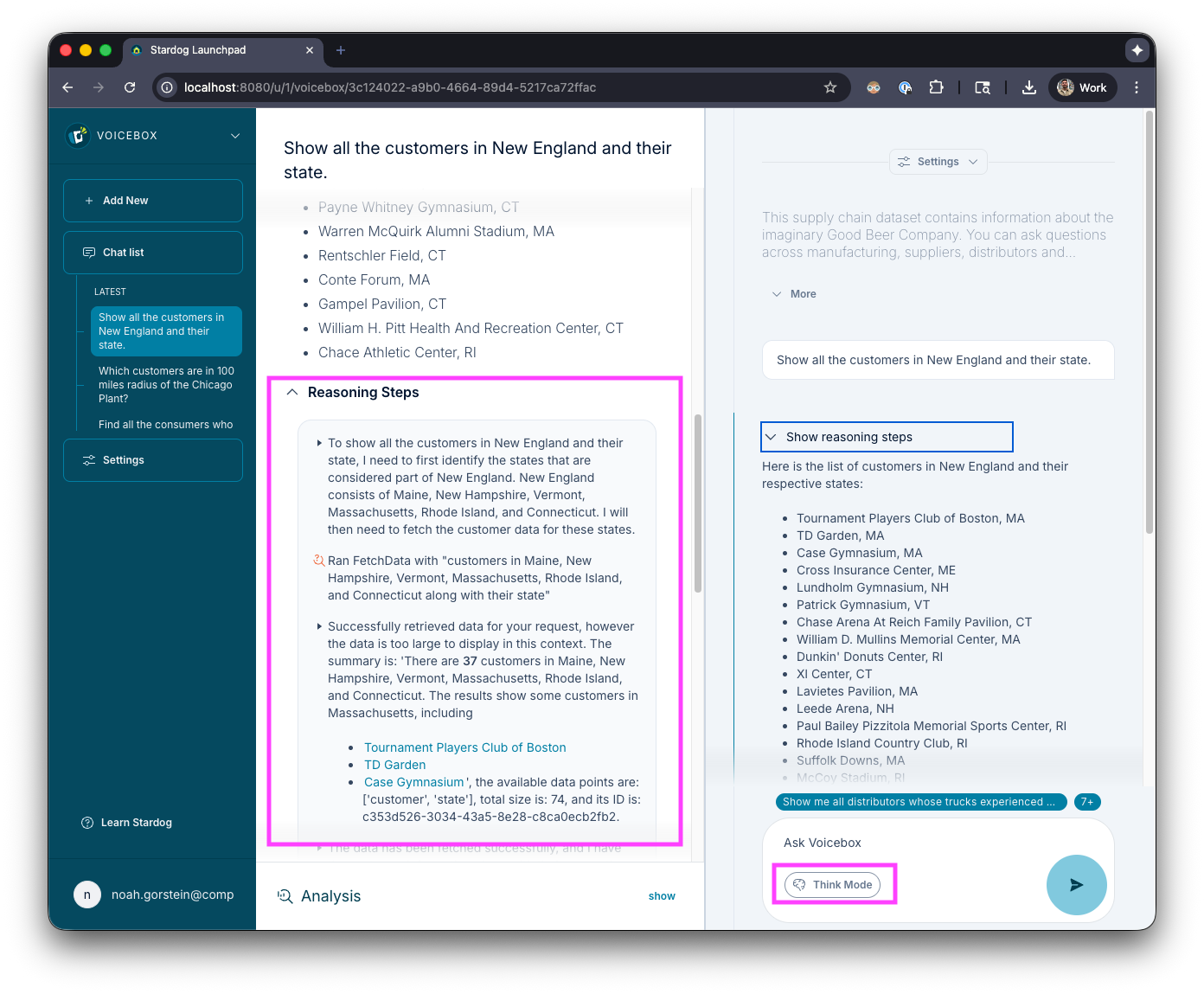
- Adds “Think Mode” option for Voicebox. Powered by a multi-agent architecture and the new and improved Voicebox 3, Think Mode enables chain-of-thought reasoning to handle complex, multi-step questions.
To enable this option for your users in your Launchpad deployment, you should add the following environment variable to your configuration:
VOICEBOX_THREE_ENABLED=true
After enabling this setting, users should see a “Think Mode” button in the input to ask Voicebox questions.
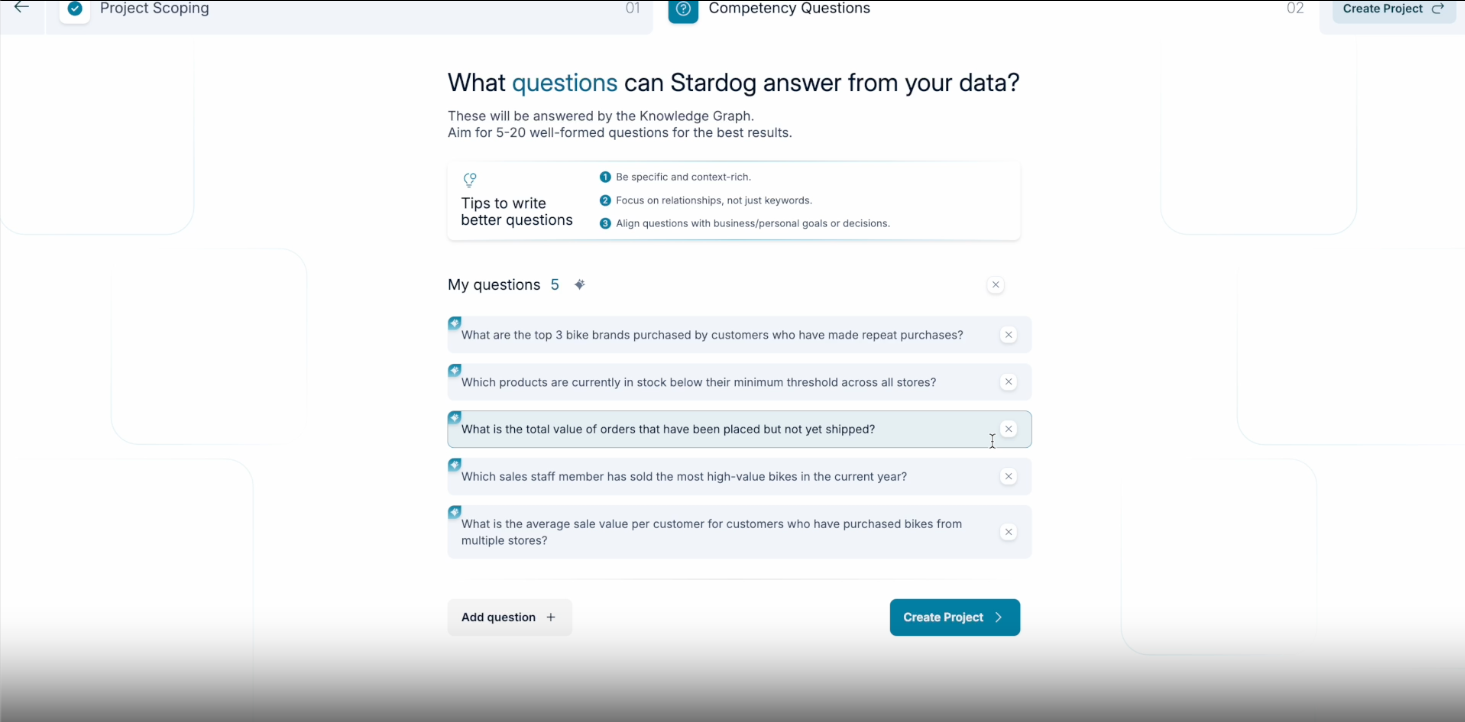
- Adds “Voicebox Suggestions” for Designer. This makes it possible to create a Voicebox enabled Knowledge Graph, complete with spotlight questions, from just a project description, input data, and a few clicks.
To enable this option for your users in your Launchpad deployment, you should add the following environment variable to your configuration:
VOICEBOX_SUGGESTIONS_ENABLED=true
After enabling this setting, users should see the new Voicebox assisted new project flow when creating a new project in Designer.
Bug Fixes
- Do not show Voicebox in the Launchpad UI if the
VOICEBOX_SERVICE_ENDPOINTis not set for Launchpad
3.5.0 Release (2025-10-02)
New Features
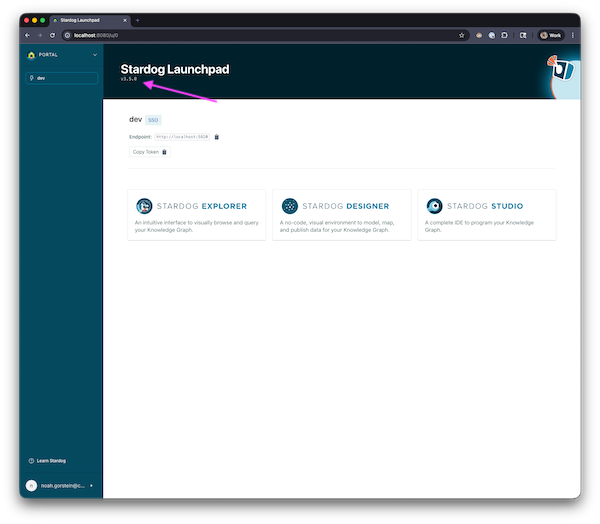
- Adds the Launchpad version to header of dashboard
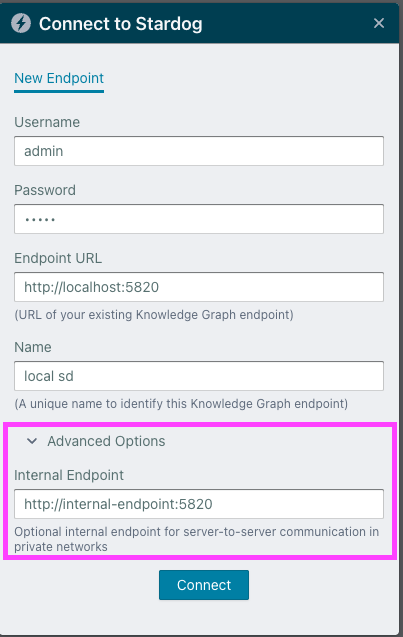
- Adds support for saving an additional internal/private endpoint for Stardog connections. The internal endpoint enables Launchpad to use a separate endpoint for server-side operations. This is particularly beneficial for the Voicebox service container, which may not be able to access Stardog on the public endpoint but can communicate using the internal endpoint. This supports architectures where different network routes are required for backend services versus browser-based access (Studio, Explorer, etc).
When both endpoints are configured, Voicebox requests will automatically use the internal endpoint while browser-based requests continue using the public endpoint.
- SSO Connections - The internal endpoint can be pre-set similar to the Stardog endpoint or the display name for the SSO connection by using the following environment variable
SSOCONNECTION_<IDENTIFIER>_<PROVIDER>_STARDOG_INTERNAL_ENDPOINT. It can always be overridden by the user creating the connection under “Advanced Options” in the SSO connection dialog.
- Username/Password Connections - The internal endpoint can be set under “Advanced Options” in the connection dialog.
- Adds support for sharing views within Explorer
3.4.0 Release (2025-07-29)
New Features
- Adds support for using Duo as a login provider to authenticate users into Launchpad using OpenID Connect (OIDC). See Duo Login Provider for more information.
- Adds support for configuring a secondary authentication provider for Microsoft Entra users based on app roles. Users with specific app roles assigned in Microsoft Entra will be required to authenticate with an additional provider (such as Duo) after successful Microsoft Entra authentication, providing an extra layer of security. See Microsoft Entra Secondary Authentication Provider for more information.
- Adds support for Microsoft Entra On-Behalf-Of (OBO) flow for seamless authentication to SSO connections. When enabled, users authenticate once via Azure login and gain seamless access to all connected Stardog instances without interactive sign-in prompts for individual connections. See On-Behalf-Of (OBO) Flow SSO Connections for more information.
- Adds button to copy connection JWT token and button to copy the endpoint from the connection details in the Launchpad UI for improved user experience.
3.3.1 Release (2025-06-20)
Bug Fixes
- Ensure all users are able to use directives (
#llm,#chart,#analyze) when asking Voicebox a question.
3.3.0 Release (2025-06-12)
New Features
- Adds support for using Kerberos to log users into Launchpad. See Kerberos Login Provider for more information.
- Adds a “public” REST API to Launchpad to programatically interact with Voicebox. See Using Voicebox Programmatically for more information.
Modifications
- Reduce noise in Launchpad logs by not logging expected unauthorized errors when user visits the login page before logging in.
Security
- Update internal packages and dependencies to eliminate all fixable CVEs (CVEs that do not have an upstream fix or patch).
3.2.0 Release (2025-05-06)
New Features
- Adds support for using shared user authentication to log users into to Launchpad, bypassing the requirement for using an SSO login provider. This is not intended for production use. See Shared User Authentication for more information.
- Adds support for saving Designer projects to the Launchpad database instead of the user’s browser’s local storage. See
DESIGNER_STORAGE_ENABLEDfor more information. You must set theDESIGNER_STORAGE_ENABLEDtotruein Launchpad configuration to enable this feature. All Designer projects will continue to be saved to browser local storage by default.
3.1.0 Release (2025-04-03)
New Features
- Adds support for using Okta as a login and connection provider
- Adds support for using PingOne as a login and connection provider
- Adds a new advanced configuration option,
GUNICORN_WORKERS, to specify how many gunicorn workers should run interally for the Launchpad server. By default, this is set to2 * number of CPU cores + 1. The default value is recommended for most use cases, but can be overridden to increase or decrease the number of workers. This is useful for environments with limited resources like memory.
Modifications
- Removes the default user
httpd(with uid1001) from the Launchpad image. Any numeric user id can be used to run the Launchpad image, but the default is nowroot(with uid0). This change was made to increase flexibility in how the Launchpad image can be run, specifically in some Kubernetes environments where it may be advisable to run the container with a numeric user id > 100000.
When running the Launchpad image with a numeric user id, the --user flag should be used to specify the user id. For example, to run the Launchpad image with a user and group id of 1001, use the following command:
   docker run \
     --user 1001:1001 \
     --env-file /path/to/launchpad/.env.launchpad \
     -p 8080:8080 \
     -v /path/to/launchpad/data:/data \
     stardog/launchpad:<tag>
On Linux, you will want to ensure that the user id you specify has the appropriate permissions to access the files and directories used by Launchpad. macOS handles file permissions differently, so you may not need to change the ownership of the files and directories. However, if you are running Launchpad on Linux and using a numeric user id, you may need to change the ownership of the files and directories used by Launchpad to match the user id you specified. For example, if you are using a user id of 1001, you can use the following command to change the ownership of the files and directories:
sudo chown -R 1001:1001 /path/to/launchpad/data
For Kubernetes, the runAsUser and runAsGroup fields in the pod security context can be used to specify the user id.
Security
- Modifies the Launchpad image to support being run with the
--read-onlyflag in Docker. This enforces the container’s root filesystem being mounted as read only. Similarly, in Kubernetes, thereadOnlyRootFilesystemoption can be set totruein the pod security context. - Change from using
python:3.11-bookwormtopython:3.11-slim-bookwormas the base image for Launchpad. This change reduces the size of the image and improves security by removing unnecessary packages and files. - Update internal packages and dependencies to eliminate all fixable CVEs (CVEs that do not have an upstream fix or patch).
3.0.1 Release (2025-02-21)
Bug Fixes
3.0.0 Release (2025-01-30)
- Inital release of Launchpad v3.
See the documentation for more information.