Launchpad Configuration
Page Contents
All Launchpad configuration options are set as environment variables on the Docker container. Options for authentication providers are documented separately, in Login Providers.
Quick Reference
| Option | Required | Default |
|---|---|---|
BASE_URL | Yes | not set |
COOKIE_SECRET | Yes | not set |
SESSION_EXPIRATION | No | 43200 |
GUNICORN_WORKERS | No | 2 * CPU cores + 1 |
SSL_ENABLED | No | false |
SSL_CERTIFICATE_FILE | If SSL_ENABLED=true | not set |
SSL_PRIVATE_KEY_FILE | If SSL_ENABLED=true | not set |
VOICEBOX_SERVICE_ENDPOINT | No | not set |
VOICEBOX_LEGACY_SERVICE_ENDPOINT | No | not set |
VOICEBOX_USE_LEGACY_SERVICE | No | false |
VOICEBOX_SERVICE_SCOPE | No | not set |
VOICEBOX_SUGGESTIONS_ENABLED | No | false |
DESIGNER_STORAGE_ENABLED | No | false |
COPY_CONNECTION_TOKEN_BUTTON_ENABLED | No | true |
API_AUTH_JWT_ENABLED | No | false |
API_AUTH_JWKS_URI | If JWT enabled | not set |
API_AUTH_ISSUER | If JWT enabled | not set |
API_AUTH_AUDIENCE | If JWT enabled | not set |
API_AUTH_REQUIRED_SCOPES | No | not set |
API_AUTH_SCOPE_CLAIM_NAME | No | scp |
API_AUTH_JWT_ALGORITHMS | No | RS256 |
API_AUTH_ACCESS_TOKEN_IDP | If multiple IdPs | not set |
Example Configuration
Here is an example of a configuration file for Launchpad. When using Docker/Docker Compose, you can pass this file to the container using the --env-file flag or equivalent in your Docker Compose file.
# General Configuration
BASE_URL=http://localhost:8080
COOKIE_SECRET=supersecret

# Microsoft Entra Login Provider (to log users into Launchpad)
AZURE_AUTH_ENABLED=true
AZURE_CLIENT_ID=<client_id>
AZURE_CLIENT_SECRET=<client_secret>
AZURE_TENANT=<tenant_id>

# Development Stardog Server SSO Connection using Microsoft Entra (to authenticate users connecting to Stardog)
SSOCONNECTION_DEVELOPMENT_AZURE_CLIENT_ID=<client_id>
SSOCONNECTION_DEVELOPMENT_AZURE_CLIENT_SECRET=<client_secret>
SSOCONNECTION_DEVELOPMENT_AZURE_TENANT=<tenant_id>
SSOCONNECTION_DEVELOPMENT_AZURE_STARDOG_ENDPOINT=http://localhost:5825
SSOCONNECTION_DEVELOPMENT_AZURE_DISPLAY_NAME=Development

# Production Stardog Server SSO Connection using Microsoft Entra (to authenticate users connecting to Stardog)
SSOCONNECTION_PRODUCTION_AZURE_CLIENT_ID=<client_id>
SSOCONNECTION_PRODUCTION_AZURE_CLIENT_SECRET=<client_secret>
SSOCONNECTION_PRODUCTION_AZURE_TENANT=<tenant_id>
SSOCONNECTION_PRODUCTION_AZURE_STARDOG_ENDPOINT=http://localhost:5826
SSOCONNECTION_PRODUCTION_AZURE_DISPLAY_NAME=Production
Core Settings
These options control how Launchpad itself runs.
BASE_URL
The BASE_URL option is used to set the base URL for Launchpad. This is the URL that users will use to access Launchpad.
- Required: Yes
- Default: not set
COOKIE_SECRET
The COOKIE_SECRET option is used to set the secret used to sign cookies in Launchpad. This should be a large, random string.
- Required: Yes
- Default: not set
SESSION_EXPIRATION
The SESSION_EXPIRATION option is used to set the expiration time in seconds for user sessions in Launchpad.
- Required: No
- Default:
43200(12 hours)
GUNICORN_WORKERS
The GUNICORN_WORKERS option is used to set the number of Gunicorn workers to use for Launchpad. By default, this is set to 2 * CPU cores + 1. This should work for most use cases, but can be overridden to increase or decrease the number of workers. This is useful for environments with limited resources like memory. This setting should be provided as a positive integer.
- Required: No
- Default:
2 * CPU cores + 1
TLS Termination
Launchpad does not terminate TLS by default. Set these to have it do so rather than fronting it with a reverse proxy.
SSL_ENABLED
The SSL_ENABLED option is used to enable SSL/TLS connection termination by Launchpad.
- Required: No
- Default:
false
SSL_CERTIFICATE_FILE
The SSL_CERTIFICATE_FILE option specifies the path within the Launchpad container to the certificate file used by Nginx in its SSL/TLS server configuration. The file containing the corresponding private key must be specified with the SSL_PRIVATE_KEY_FILE option.
- Required: No, unless
SSL_ENABLED=true - Default: not set
SSL_PRIVATE_KEY_FILE
The SSL_PRIVATE_KEY_FILE option specifies the path within the Launchpad container to the private key file used by Nginx in its SSL/TLS server configuration. The file containing the corresponding certificate must be specified with the SSL_CERTIFICATE_FILE option.
- Required: No, unless
SSL_ENABLED=true - Default: not set
Voicebox
These options point Launchpad at the Voicebox Service and control which Voicebox features are available. The service has its own configuration, set on its own container.
VOICEBOX_SERVICE_ENDPOINT
The VOICEBOX_SERVICE_ENDPOINT option is used to specify the endpoint for the Voicebox Service. This is used to enable Voicebox in Launchpad. All Voicebox traffic is routed here unless VOICEBOX_USE_LEGACY_SERVICE is enabled.
As of Launchpad v4.0.0, this option must point at a Voicebox Service v1.0.0 or later deployment. See the 4.0.0 release notes for the upgrade steps.
- Required: No
- Default: not set
VOICEBOX_LEGACY_SERVICE_ENDPOINT
The VOICEBOX_LEGACY_SERVICE_ENDPOINT option specifies the endpoint of a Voicebox Service v0.x deployment, kept available as a rollback target. Launchpad never routes traffic here unless VOICEBOX_USE_LEGACY_SERVICE is set to true.
- Required: No
- Default: not set
VOICEBOX_USE_LEGACY_SERVICE
The VOICEBOX_USE_LEGACY_SERVICE option routes all Voicebox traffic to the deployment configured in VOICEBOX_LEGACY_SERVICE_ENDPOINT, rather than to VOICEBOX_SERVICE_ENDPOINT. Use it to roll back to v0.x if you encounter problems with v1.x. It is only for rolling back to a v0.x deployment; it is not a way to select between two v1.x deployments.
This option is intended as a temporary measure while you resolve an upgrade problem, not as a long-term configuration. A deployment left on v0.x does not receive Voicebox improvements and will need to move to the current service eventually. Plan to unset it once the underlying issue is resolved.
Set VOICEBOX_LEGACY_SERVICE_ENDPOINT as well. Enabling this option without a legacy endpoint configured logs a voicebox_legacy_rollback_misconfigured error at startup and leaves Voicebox non-functional.
- Required: No
- Default:
false
VOICEBOX_SERVICE_SCOPE
The VOICEBOX_SERVICE_SCOPE specifies the OAuth scope for Voicebox service authentication when using JWT-based authentication with Okta.
See JWT Authentication with Okta for complete setup instructions.
- Required: No (only required when using JWT authentication)
- Default: not set
VOICEBOX_SUGGESTIONS_ENABLED
The VOICEBOX_SUGGESTIONS_ENABLED option enables the “Voicebox Suggestions” feature in Designer. This makes it possible to create a Voicebox-enabled Knowledge Graph, complete with spotlight questions, from just a project description, input data, and a few clicks. When enabled, users will see the new Voicebox-assisted project creation flow when creating a new project in Designer.
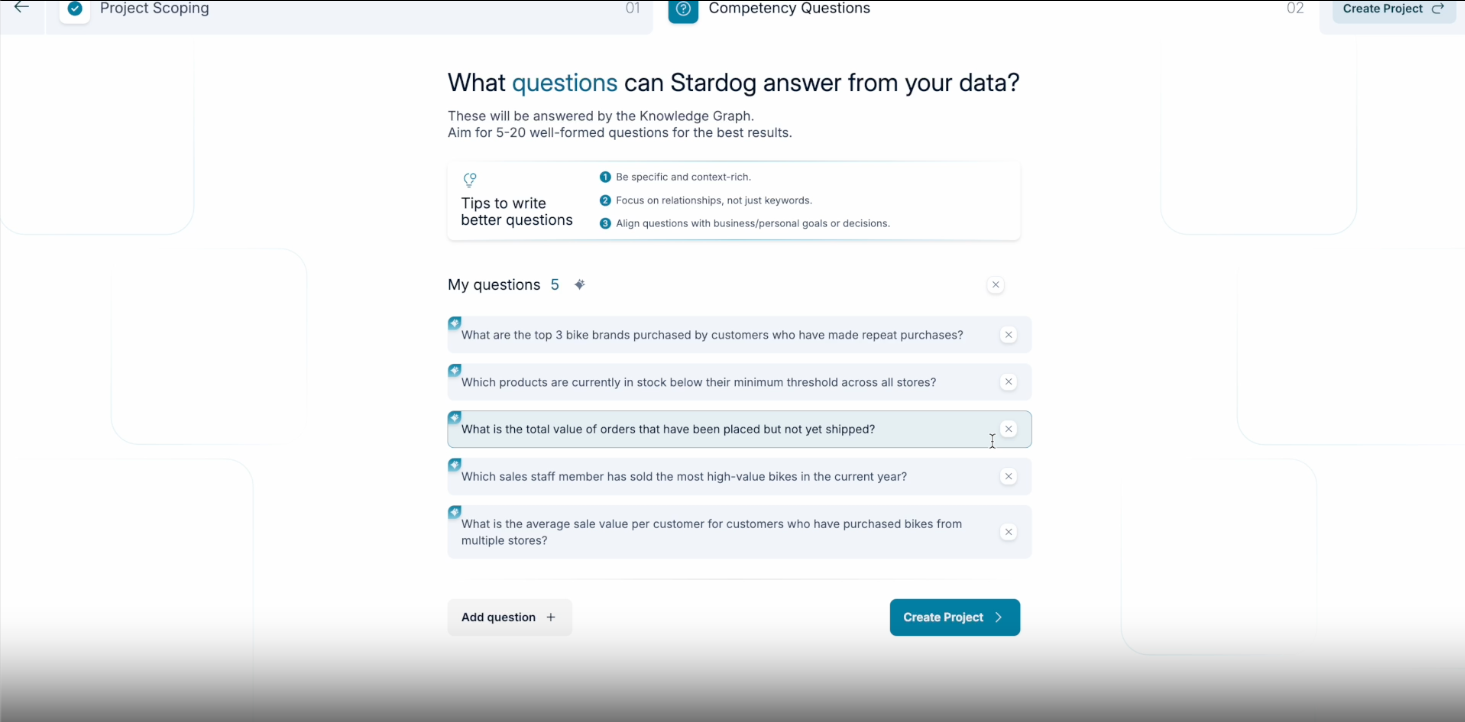
This feature requires Voicebox Service version v0.22.0+ and Stardog version v11.2.0+. See the Voicebox Release Notes and Stardog Release Notes for more information.
- Required: No
- Default:
false
Stardog Applications
These options control behaviour of the Stardog Applications bundled with Launchpad.
DESIGNER_STORAGE_ENABLED
The DESIGNER_STORAGE_ENABLED option is used to configure the storage location for projects in Stardog Designer. By default, this should be set to false, resulting in projects being stored in a user browser’s local storage. If set to true, projects will be stored in the Launchpad database under your Launchpad user account.
It is recommended to set this to true to avoid accidental data loss of Designer projects if the user clears their browser’s local storage.
- Required: No
- Default:
false
COPY_CONNECTION_TOKEN_BUTTON_ENABLED
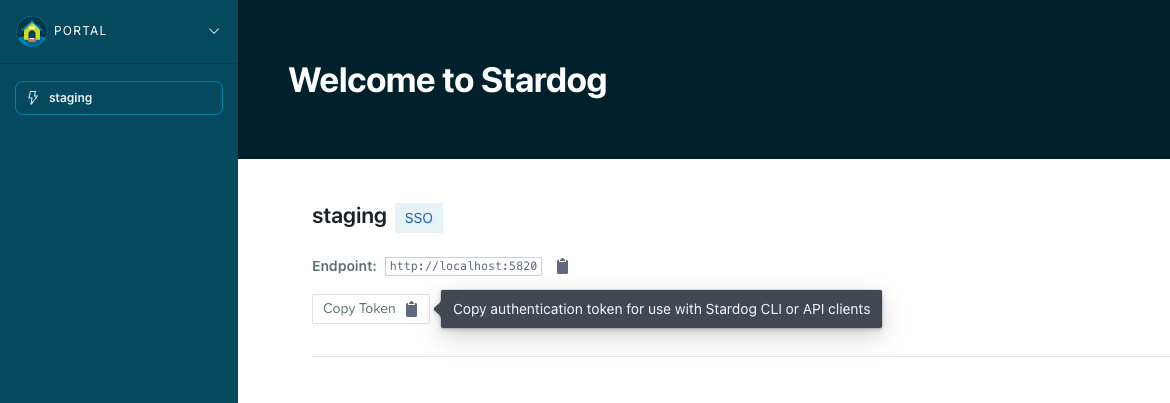
The COPY_CONNECTION_TOKEN_BUTTON_ENABLED option controls whether the “Copy Token” button is displayed on Stardog connection pages, allowing users to copy the JWT authentication token to their clipboard. Administrators can disable this button if they prefer not to expose this functionality to users.
- Required: No
- Default:
true
Public API JWT Authentication
The following environment variables configure JWT-based authentication for the Launchpad public API (/api/v1/*). This allows external applications to access the Voicebox API using access tokens from an identity provider.
See JWT Authentication with Okta — Public API Authentication for complete setup instructions.
API_AUTH_JWT_ENABLED
Enables JWT authentication for the public API. The options below take effect only when this is true.
- Required: No
- Default:
false
API_AUTH_JWKS_URI
The URL from which to fetch the public keys (JWKS) used to validate access tokens.
- Required: If JWT authentication is enabled
- Default: not set
API_AUTH_ISSUER
The issuer (iss) claim expected in access tokens.
- Required: If JWT authentication is enabled
- Default: not set
API_AUTH_AUDIENCE
The audience (aud) claim expected in access tokens.
- Required: If JWT authentication is enabled
- Default: not set
API_AUTH_REQUIRED_SCOPES
A comma-separated list of scopes a token must carry to be accepted. When unset, any authenticated caller is accepted.
- Required: No
- Default: not set
API_AUTH_SCOPE_CLAIM_NAME
The claim containing the token’s scopes. Falls back to scope when the named claim is absent.
- Required: No
- Default:
scp
API_AUTH_JWT_ALGORITHMS
The signing algorithms accepted when validating tokens.
- Required: No
- Default:
RS256
API_AUTH_ACCESS_TOKEN_IDP
The identity provider to use for token exchange. Set this when more than one identity provider is configured.
- Required: If multiple identity providers are configured
- Default: not set